
XML Sitemap Optimization: How to Improve Crawlability
XML sitemap optimization improves website crawlability, helps search engines discover important pages, and supports better indexing. Learn how to structure sitemaps, remove outdated URLs, manage canonical pages, and strengthen technical SEO.
A sitemap is one of the simplest files on a website.
It is also one of the easiest technical SEO elements to get wrong.
Many websites automatically generate an XML sitemap, submit it to Google Search Console once, and never look at it again. Over time, that sitemap starts accumulating redirected URLs, duplicate pages, outdated content, parameterized URLs, or pages that should never have been submitted for indexing in the first place.
At that point, the sitemap is technically present but strategically weak.
XML sitemap optimization is about making sure the sitemap accurately represents the URLs you actually want search engines to discover, recrawl, and consider for indexing.
It does not make a page rank.
It does not force Google to index a URL.
And it cannot repair poor site architecture.
What it can do is provide search engines with a cleaner map of your important content, particularly on large, frequently updated, new, or structurally complex websites.
What Does an XML Sitemap Actually Do for SEO?
An XML sitemap for SEO is a machine-readable list of URLs a website wants search engines to know about.
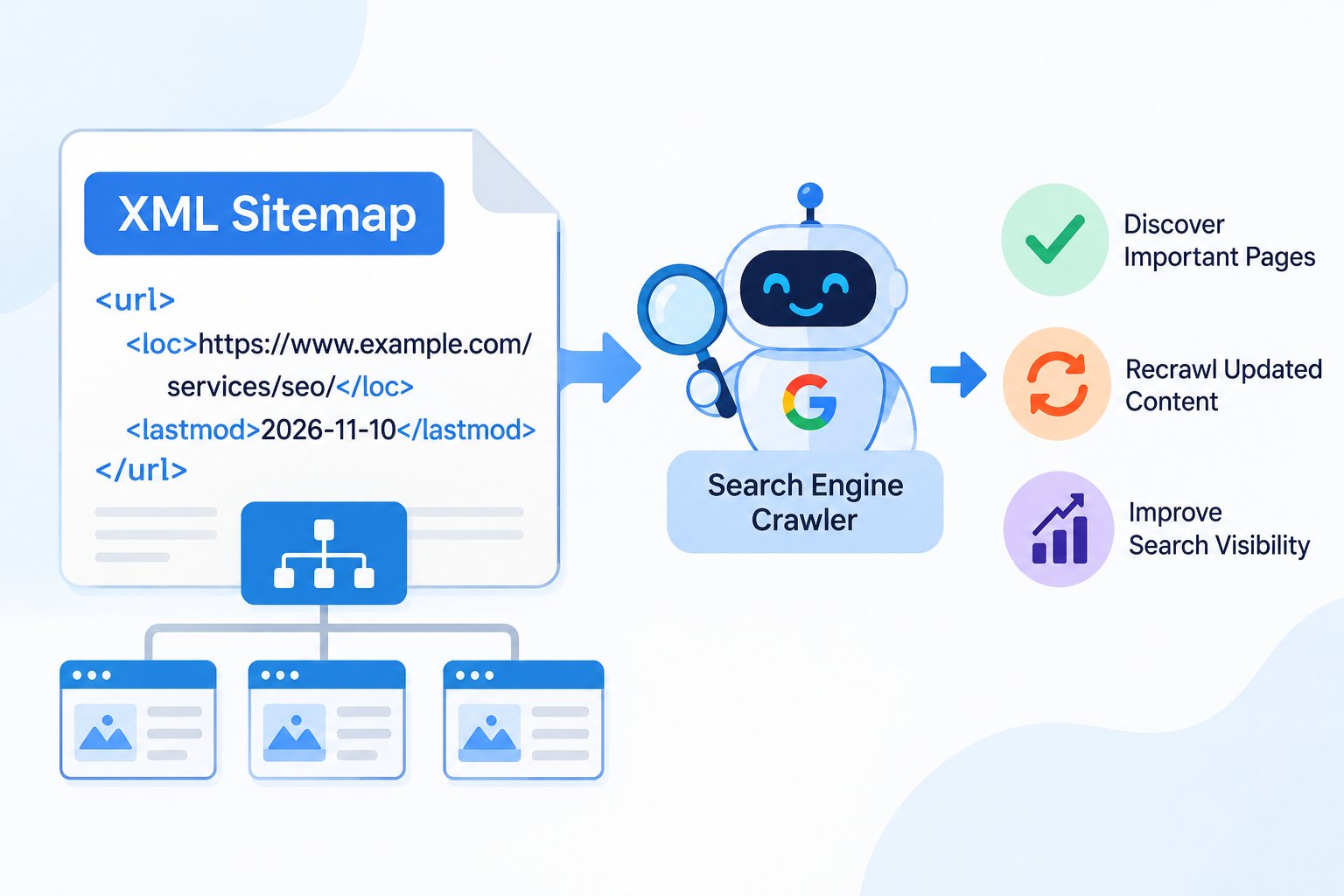
A basic entry may look like this:
<url>
<loc>https://www.example.com/services/seo/</loc>
<lastmod>2026-11-10</lastmod>
</url>
The <loc> field identifies the URL. The optional <lastmod> field tells crawlers when the page was last meaningfully updated.
Google can use accurate <lastmod> information when deciding whether a page may need to be recrawled. The date should reflect substantive changes rather than routine updates such as a copyright-year change. Google ignores the older <priority> and <changefreq> values for crawling decisions.
This makes sitemap management an important part of technical SEO optimization.
Sitemaps Support Architecture; They Do Not Replace It
Search engines primarily discover pages by following crawlable internal links.
An important page buried deep in the site with little or no internal linking does not become well optimized simply because it appears in sitemap.xml.
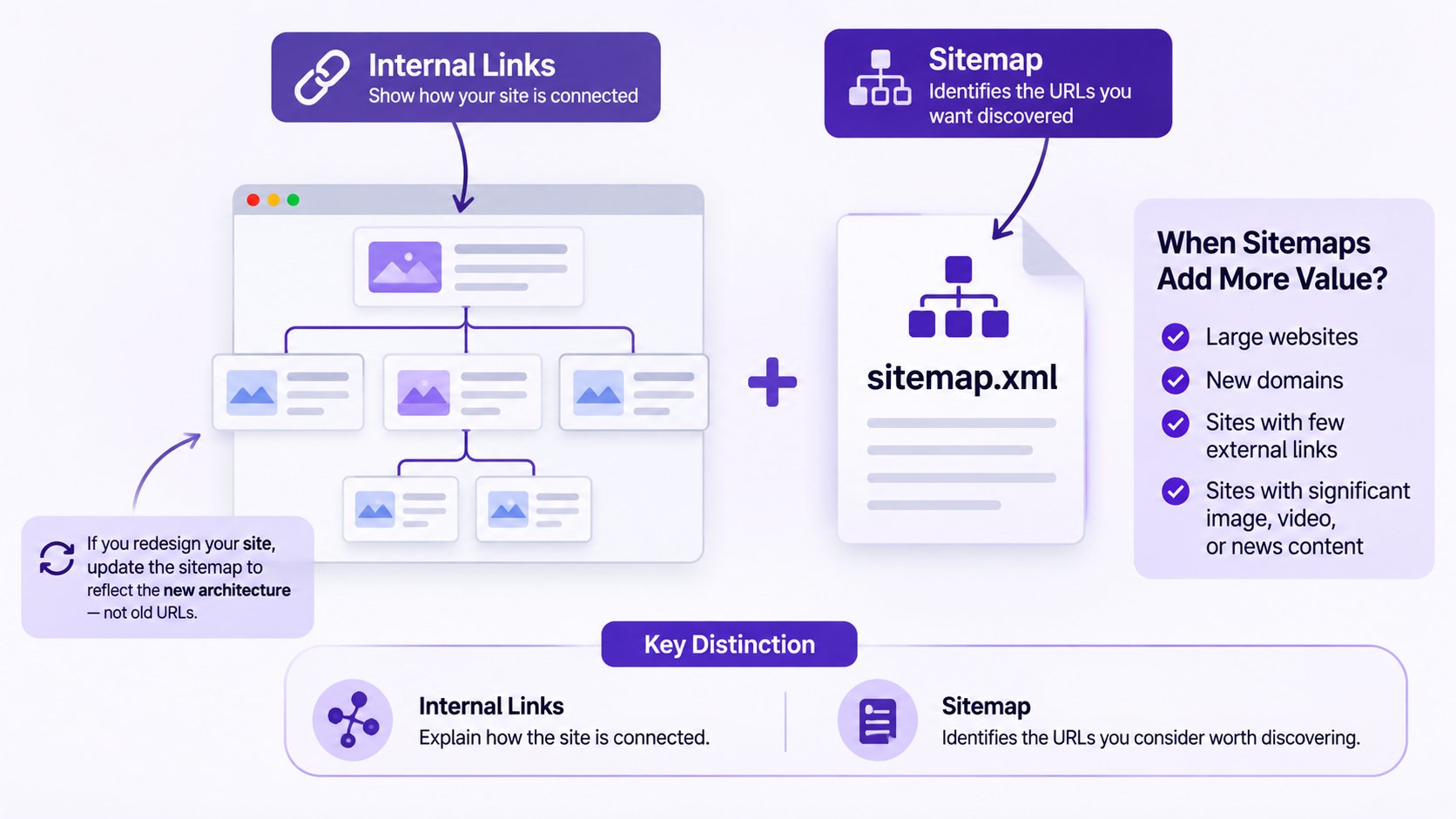
Google notes that smaller websites with comprehensive internal linking may not need a sitemap at all. Sitemaps become more valuable for large sites, new domains, sites with few external links, and websites containing significant image, video, or news content.
This is why website architecture and crawlability should be managed together.
If a redesign changes URL paths, categories, navigation, or content relationships, the sitemap should reflect the new architecture rather than preserving obsolete URLs.
A useful distinction is:
Internal links explain how the site is connected. The sitemap identifies the URLs you consider worth discovering.
What URLs Should Be Included?
One of the most important sitemap best practices is to include only URLs you genuinely want indexed.
Those URLs should generally be:
canonical,
indexable,
returning a 200 status code,
useful enough to appear in search,
and representative of the preferred version of the page.
Google recommends submitting canonical URLs in sitemaps. Sitemap inclusion can also act as a weak canonicalization signal alongside stronger signals such as redirects and rel="canonical".
URLs that should usually stay out include redirects, 404 or 410 pages, noindex pages, duplicate variants, unwanted parameter URLs, staging URLs, session-based URLs, and noncanonical pages.
A sitemap should function as an indexation shortlist, not a complete export of every URL the CMS can generate.
XML Sitemap Structure for Large Websites
Google allows up to 50,000 URLs or 50 MB uncompressed per sitemap. Larger sites need multiple sitemap files, usually organized through a sitemap index.
Even below that limit, segmentation can be useful.
For example:
/sitemap-products.xml
/sitemap-categories.xml
/sitemap-services.xml
/sitemap-blogs.xml
/sitemap-locations.xml
This makes indexing issues easier to diagnose.
If 95% of service URLs are indexed but only 40% of product URLs are, segmented sitemaps make that pattern easier to identify in Search Console.
This becomes particularly useful for ecommerce websites, publishers, marketplaces, and enterprise platforms with thousands of dynamically generated pages.
It also connects directly with technical SEO and crawl budget management.
Do Not Treat Every Indexing Problem as a Crawl-Budget Problem
“Crawl budget” is frequently overdiagnosed.
Google's crawl-budget guidance is mainly relevant to very large or rapidly changing websites. Sites with millions of URLs, or tens of thousands of pages changing frequently, need to think carefully about how crawling resources are used. Smaller sites usually have other problems to solve first.
If Google is not indexing ten pages on a 300-page website, increasing crawl budget is unlikely to be the answer.
More useful questions are:
Are the pages internally linked?
Are they duplicates?
Are the canonicals correct?
Are they blocked?
Is JavaScript preventing reliable discovery?
Are the pages useful enough to justify indexing?
Good search engine crawling and indexing analysis starts with evidence rather than assuming crawl scarcity.
Use <lastmod> Only When It Is Accurate
The <lastmod> tag is useful only when it can be trusted.
One common mistake is updating the date every time the sitemap regenerates, regardless of whether the page itself changed.
If a blog published in March has not been materially updated, its date should not automatically become November.
Update <lastmod> when meaningful changes occur, such as:
substantial content revisions,
important product or pricing changes,
major structured-data updates,
significant link changes,
or other material page modifications.
Reliable timestamps help crawlers distinguish genuinely updated content from pages that have not changed.
Automate Sitemap Hygiene
Sitemap maintenance should ideally be tied to the same logic that controls canonicalization and indexability.
If a page becomes noindex, remove it.
If a product is permanently retired, remove the URL.
If a redirect is created, exclude the old destination.
If a new canonical page is published, add it automatically.
Regular validation should also check for non-200 status codes, canonical mismatches, duplicate URLs, malformed XML, incorrect hostnames or protocols, and unexpected changes in submitted URL counts.
This keeps SEO crawlability and indexing signals consistent without relying on manual cleanups.
Sitemaps for Images, Video, News, and International Sites
XML sitemaps can communicate more than standard webpage URLs.
Google supports sitemap extensions for image, video, and news content, as well as localized page information.
This matters when non-text assets play a major role in search visibility.
News publishers can maintain dedicated news sitemaps. Video-heavy sites can provide additional video metadata. International websites can use sitemap annotations alongside hreflang implementations.
The right XML sitemap structure should therefore reflect both the website architecture and the types of content the business wants search engines to discover.
XML Sitemaps and AI Search Accessibility
Search visibility now extends beyond conventional Google results.
AI search platforms also need access to public web content before they can retrieve, cite, or reference it.
That does not mean an optimized XML sitemap automatically improves AI citations. Different systems use different crawlers, indexes, and discovery mechanisms.
OpenAI, for example, uses OAI-SearchBot for content that may appear in ChatGPT Search.
This makes AI search accessibility and indexing part of the wider technical visibility stack.
Alongside XML sitemaps, businesses should review robots directives, CDN and firewall rules, bot protection, server accessibility, canonicalization, and the crawler requirements of individual AI platforms.
How to Submit an XML Sitemap to Google
The standard approach is Google Search Console.
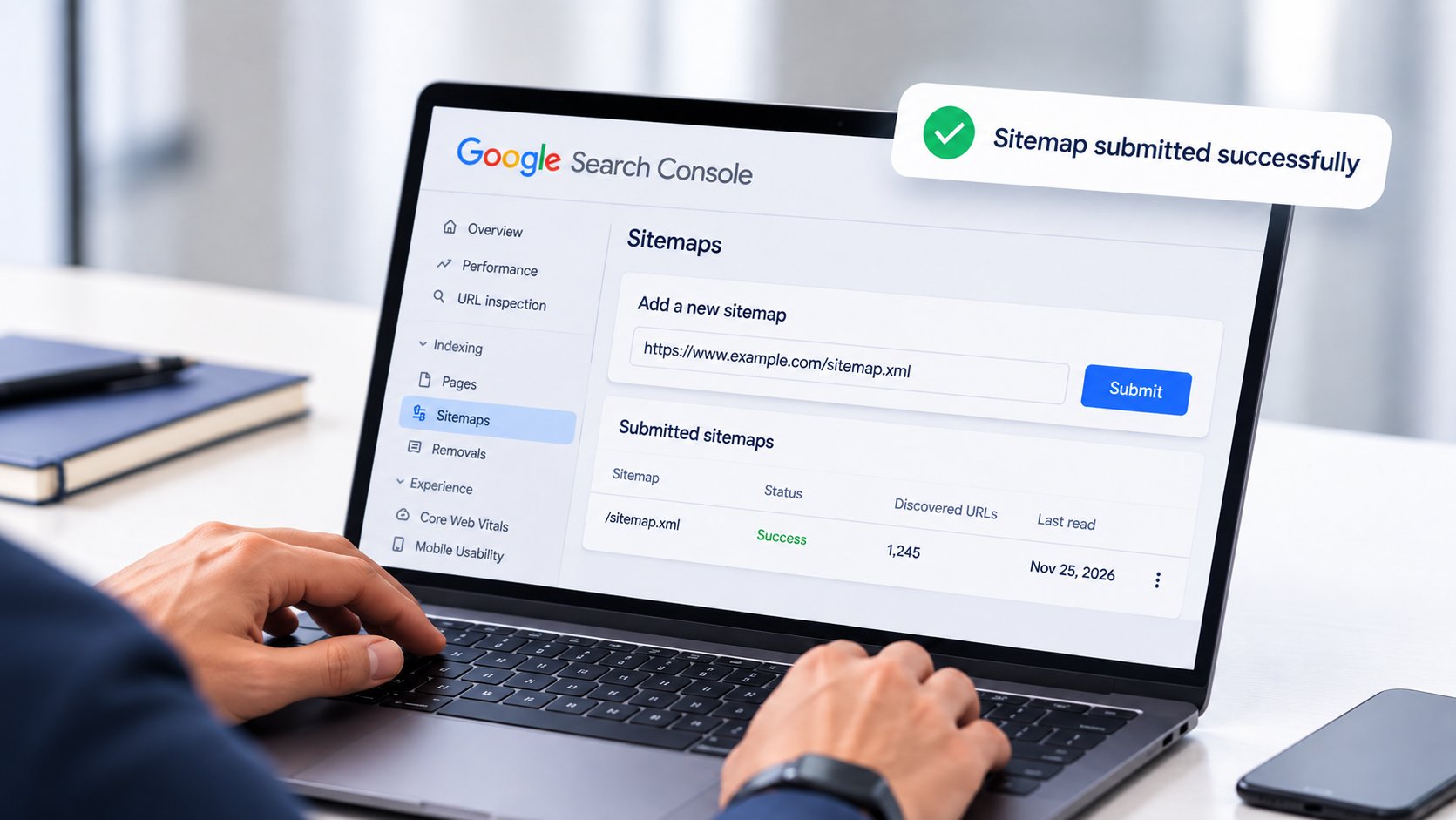
Open the relevant property, go to Sitemaps, enter the sitemap or sitemap-index URL, and submit it.
Search Console then reports whether Google successfully processed the file and highlights relevant errors.
The sitemap can also be referenced in robots.txt:
Sitemap: https://www.example.com/sitemap.xml
Repeatedly submitting an unchanged sitemap will not accelerate indexing. Sitemap submission is a discovery signal rather than an instruction to crawl every URL immediately.
How to Tell Whether Your Sitemap Is Working
The most useful metric is not the total number of submitted URLs.
It is the relationship between submitted URLs and pages that are genuinely indexable.
If a large share of submitted URLs remains unindexed, investigate the pattern.
Check whether those pages are duplicates, low-value, canonicalized elsewhere, returning errors, weakly linked internally, or discovered but not selected for indexing.
The sitemap helps expose these patterns, but the underlying issue may sit elsewhere in the site.
That is why sitemap management should be treated as part of a broader organic visibility strategy, alongside architecture, internal linking, content quality, canonicalization, and technical accessibility.
XML Sitemap Optimization Is About Better Signals
A strong XML sitemap does not need to be complicated.
It needs to be accurate.
It should identify canonical, indexable URLs, reflect meaningful updates, and stay aligned with the site's actual architecture.
At MMB, we look at XML sitemap optimization as one component of the larger technical SEO system. Sitemaps, internal linking, crawler access, indexability, canonicalization, and content quality should reinforce the same message about which pages matter.
When those signals are aligned, search engines have a clearer path to the content you want discovered and technical SEO becomes considerably easier to manage.
Loading FAQs
Please wait while we fetch the questions...
Published on November 26, 2026 by Surbhi Sood